HubSpot News October 2023
All-time high
70 new HubSpot features!
It's a new record: HubSpot is storming into the fall with 70 red-hot innovations and product highlights. From content staging and the CRM editor for data pages to automatic follow-ups for registrations: See for yourself which October innovations are the most interesting and helpful for you.
Marketing Hub
Assign business units to workflows (Assign Business Units to Workflows)
With business units, you can manage multiple brands in a single HubSpot account. You can find out exactly how this works here.
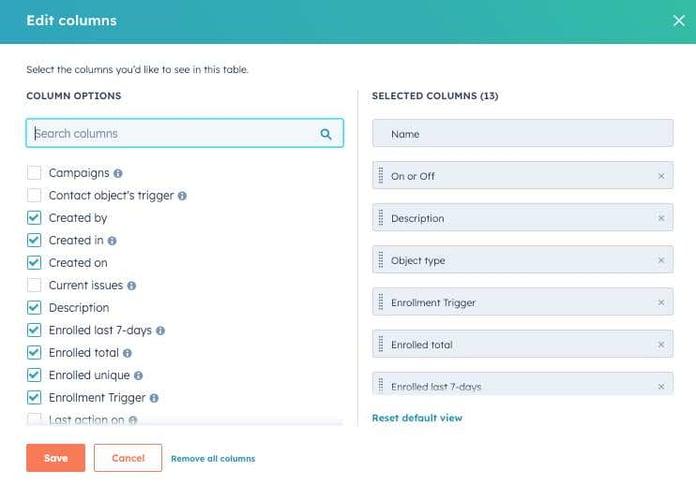
Fig. 1: Integration of your business units into workflows (source: HubSpot)
By integrating business units into workflows, you have the opportunity to better align your marketing automation and processes with different brands or business units. The requirements and objectives of each unit can be addressed much more specifically and managed even more efficiently.
Learn more about how to organize your workflows
*Only available for Marketing Enterprise customers
Support in sight: Your first comment on Instagram (Instagram First Comment Support)
Planning your first comment for your Instagram posts? HubSpot supports you!
A successful Instagram post not only requires a meaningful headline and relevant hashtags, but also optimal use of space.
Use the first comment to interact directly with users, increase engagement with additional hashtags and increase your reach on Instagram.
*Available for Marketing Hub Pro+ customers
Ask HubSpot Academy in ChatSpot (Ask HubSpot Academy in ChatSpot)
Great news for all inquisitive minds: HubSpot Academy is now also a valuable source of knowledge for ChatSpot users - meaning users can use it to access 600 hours of approved educational content from HubSpot! Anyone who wants more information or context will receive immediate support: the answers in ChatSpot then link to the appropriate video from which the answer originates. And if you ask specifically for "Academy", you will receive an answer directly from the Academy experts. If not, ChatSpot automatically grabs the answer from the Academy when it realizes that this is the best source of information
Let's go - get to know ChatSpot!
*Available for all ChatSpot users
Customer Journey Analytics now supports campaign filtering (Customer Journey Analytics now supports campaign filtering)
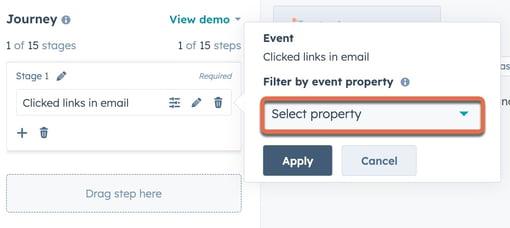
Fig. 2: All touchpoints at a glance: Customer Journey Analytics (source: HubSpot)
New in Customer Journey Analytics: You can now easily filter touchpoints that originate from a specific campaign. For example, if you only want page views, form submissions or email clicks that are linked to a specific campaign, you can now easily select them in the event filter when creating your report.
*Only available for Marketing Enterprise customers
Redesign of the email probe (Email Probation Redesign)
And here's a great update for Marketing Enterprise customers: The email trial banner has been redesigned. The text has been clarified, clear indications of the severity of the situation have been added, and there is generally more support to help you better understand the email process and the potential impact of non-delivery.
By way of background, if you are using the free HubSpot tools or a Marketing Hub Starter account, email delivery is automatically put into a trial state. The aim is to protect your reputation as a sender as soon as one of your key email sendability or deliverability metrics falls below a certain threshold. The new feature therefore acts as an early warning signal for possible deterioration.
More on the topic: Emails on trial
*For all Free and Marketing Starter customers
Merging task data in activity reports (Merging Task data in Activity reports)
This update ensures that data from publishing tasks (also known as campaign tasks) are integrated under the activity type "Tasks" in the activity reports.
*Available for Marketing Hub Pro+ customers
Add static lists directly to campaigns (You can now add your static lists to your campaigns directly from within the Lists tool)
You can now add your static lists to your campaigns directly from within the Lists tool - more specifically, the contact-based static lists. The new 'Add to campaign' feature simplifies your workflows and allows you to quickly and easily add your lists to new and existing campaigns in HubSpot.
*Available for Marketing Hub Pro+ customers
New features in Journey Analytics: Rolling date ranges & fresh card design (Rolling date ranges & new card design in Journey Analytics)
When creating a report in Journey Analytics, you now have two date range options: you can either choose a static range where the date is fixed or use a rolling date range. On top of this, the newly designed maps in the staging area offer more insights for report creation.
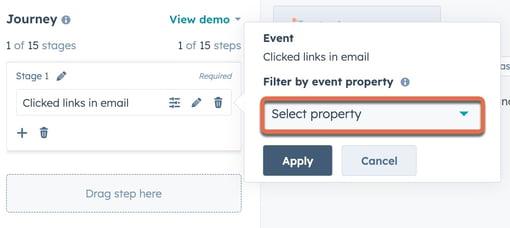
Fig. 3: Creating reports - easier than ever (Source: HubSpot)
More on the topic: Creating reports
*Only available for Marketing Hub Enterprise customers
SMS events in a contact's activity feed (SMS Events on Contact's Activity Feed)
SMS deliverability and engagement activities such as SMS delivery confirmations, SMS clicks and much more: You can now retrieve all of this directly from each contact's activity feed for a better overview!
*Available for Marketing Hub Pro+ customers
Manage subscription types and statuses across business units
Finally: You now have the ability to manage individual subscription types and statuses across business units! This means that each subscription type can be conveniently managed separately. For example, contacts who unsubscribe from one business unit will remain subscribed in the other business units of your portal.
*Available for Marketing Hub Pro+ customers
Build lists filtered by an SMS subscription status
This new feature allows you to easily create static or dynamic lists based on SMS subscription status: subscribed, not subscribed, unsubscribed.
*Available for Marketing Hub Pro+ customers
CMS Hub
Options for Contacts to Download or Delete Their Data
What a cool new feature: you can now add modules that allow your contacts to download or delete their personal data stored in HubSpot.
Once the feature is enabled, your contacts will find clear instructions on how to download or delete their data on their email subscription settings page. Of course, it is entirely up to you whether you want to make these options available to your contacts or not.
*Available for CMS Hub Pro+ customers
Clone for content staging (Stage Detached Clone)
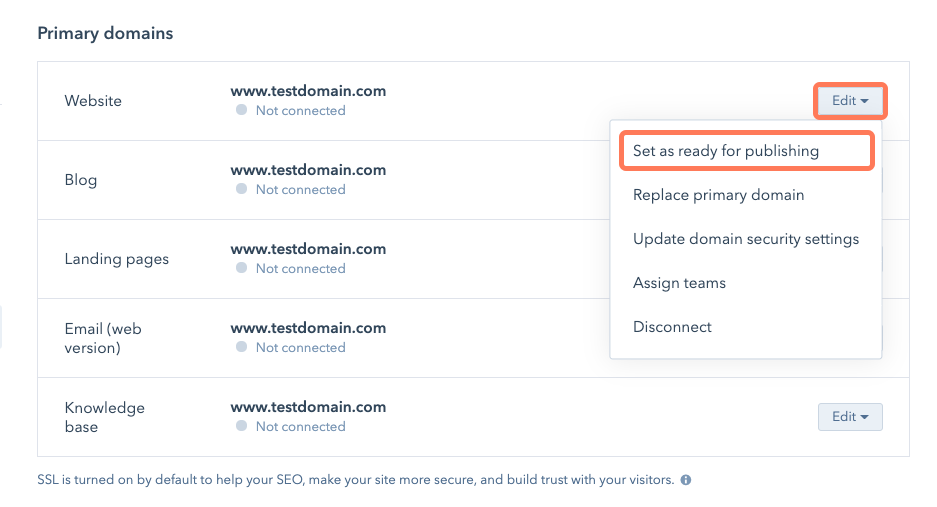
Fig. 4: Simply test: Content staging (Source: HubSpot)
With the content staging tool, you can redesign and relaunch your website and landing pages in a secure test or staging environment. You can redesign and replace existing pages hosted by HubSpot or create new pages from scratch. The great thing is that you can now also clone (or duplicate) existing HubSpot-hosted pages and publish them as brand new pages.
Redesign and relaunch your website with content staging
*Available for CMS Hub Pro+ customers
Marketing + CMS Hub
Approval in Collaboration Sidebar (Approvals Activity in Collaboration Sidebar)
You can now track approval activities in the Collaboration sidebar. In the "Approvals" tab of the Collaboration sidebar, the "Activities" section describes all activities related to these approvals.
More on the topic: Request approval for marketing emails
*Available for Marketing Hub and CMS Hub Enterprise customers
Drag and drop version of the collaboration sidebar (Drag and drop version of the collaboration sidebar)
The drag and drop version of the collaboration sidebar (already available in workflows,dashboards,marketing emails andforms ) is now integrated into all HubSpot tools that still use the older version, for example:
- Ads
- blog
- campaigns
- landing pages
- SMS MESSAGES
- Websites
This feature gives marketers quick access to useful collaboration and productivity tools. The original design took up a lot of space on the right side of the screen and was not customizable. The upgrade offers a much more compact, movable version of the comment sidebar, which can also be placed in the ideal position as desired.
*Available for Marketing and CMS Hub Pro+ customers
Saved Views and a new Gallery mode for CTAs
Saved Views now allow you to filter all CTAs by "Advanced Filters" and save this filter set for yourself, your team or all users in your portal. This allows you to focus on specific CTAs - whether drafts, recently published or self-created CTAs. Brand new features for filtering and viewing, e.g. AND/OR filtering, improved view management and a brand new "Gallery" mode are also included.
And the highlight: The gallery mode presents a completely new way to visualize and manage your CTAs. Instead of the standard table layout, the gallery creates a visual layout that focuses on the preview images of the CTAs, in addition to basic information such as name, status and performance. The preview image is often the quickest way to distinguish one CTA from another. In the past, the preview image was limited to a tiny cell in the table. With the new "Gallery" mode, the preview takes center stage and offers you great insights - you have everything at a glance!
*Available for Marketing and CMS Hub Starter+ customers
Sales Hub
Lead management in the acquisition workspace (Lead Management in Prospecting Workspace)
In the prospecting workspace, lead management in the Sales Hub is revolutionized by a new object called "Leads": This terrific update in HubSpot changes the way sales reps can manage their prospecting and qualification activities for both inbound and outbound demand gen activities. Lead management is done via special tabs in the acquisition workspace.
Please note: Leads do NOT replace existing contacts, but act as an additional object, comparable to deals or tasks. Leads can be linked to contact and/or company records.
*Available for Sales Hub Pro+ customers with an assigned sales seat
Service Hub
Sharing a link to Messages in the Conversations Inbox & Help Desk (Sharing a link to Messages in the Conversations Inbox & Help Desk)
Fantastic: No more wasting time endlessly scrolling through long emails and correspondence to find a specific message! With deep linking of messages, you can now copy and paste the link to any message in the Inbox or Help Desk to share with your entire team.
*Available for all Hubs and Tiers
Sales + Service Hub
Reminder Defaults, Reminders for CRM bookings, and Reminders for Proposed Times bookings
There is now the ability to set default reminder intervals as well as reminders for meetings booked through the CRM and for meetings scheduled through the Proposed Times in Meetings feature. Previously, reminder emails could only be configured automatically via the scheduling pages.
*Available for all Hubs and Tiers
Redirection of a lead form (Lead Form Routing)
With "Lead Form Routing", the meeting booking process is impressively streamlined and scheduling is a breeze because there are no more generic redirects! From now on, you can use information collected in your forms to tailor the visitor's experience. This guarantees that they are redirected to the meeting link that is most relevant to their needs.
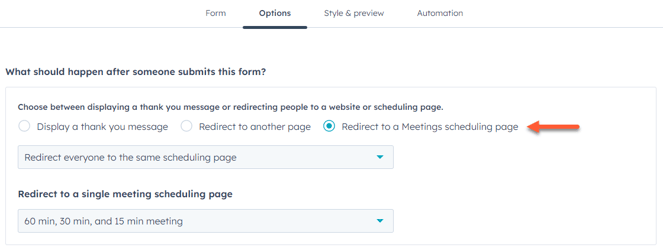
Fig. 5: Redirect forms easily (Source: HubSpot)
Details on this: Redirecting a form to a scheduling page
*Available for Sales and Service Hub Enterprise customers
Create your own goal templates (Create your own Goal templates)
With custom goals, you can select objects and properties according to your needs and use specific filters. Your goals can be individually adapted to your company.
It used to be very time-consuming to redefine custom goals for each new period. Today, you can save the definition as a target template. These templates are then available in your Goals template library in the 'My templates' section. This makes it much easier to reuse them without having to redefine your custom goals each time - whether for a new month, a new quarter or a new year.
*Available for Sales and Service Hub Enterprise customers
Block call list (Block Number List)
Whether business or private: efficient communication is essential for every call experience. In business, protecting your callers from spam and fraudulent callers is very important as it strengthens the security and reputation of your company. With the 'Block Number List', Admins and Super Admins can protect their team from potential spam and data breaches while ensuring the highest level of inbound call accuracy.
*Available for all Sales and Service Hub Starter+ customers
Operations Hub
Easily Review Data Model Adoption & Usage
With the new data model overview, you can quickly get an overview of the completeness and usage of your data.
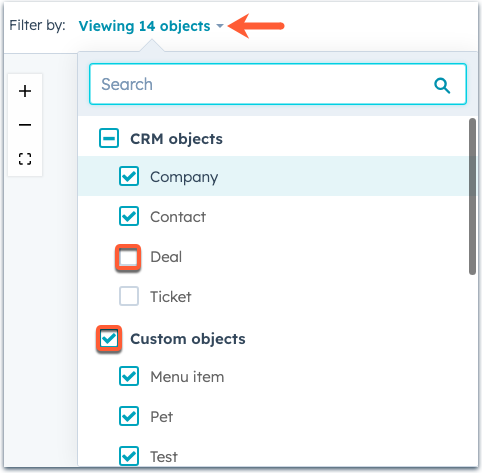
Fig. 6: New data model overview (Source: HubSpot)
*Available for all hubs and tiers
API Custom actions: Organize data by workflow type (Custom Actions API: Customize the data you return based on workflow type)
When you create your own custom workflow actions and use external data fields, the object type of the workflow in which the action is used is passed so that you can customize the data you return.
More about custom workflow actions
*Available for all hubs and tiers
Notifications for Workflow Issues
Now you can get notified about workflow issues in different ways (all workflow-based!) - via Slack, email, Facebook Workplace, MS Teams, mobile device, browser or in-app messages. Less business-critical workflows can still be conveniently managed via the "Workflows need to be checked" tab.
At the same time, however, you will receive messages when problems occur in important workflows or after a certain period of time without checking. So you are always up to date when it's really important! Best of all, the new workflow notifications are now available in HubSpot portals at the enterprise level.
*Only available for Enterprise customers
Data Sync Inspect by Record View
Data Sync already supports over 100 different integrations in the market, for a variety of objects - from contacts to deals to invoices. With all these potential integrations that synchronize data, it's important that you can see exactly what's happening.
The 'Inspect by Record View' update gives you a 360° view of the Data Sync processes. Once you have set up a Data Sync integration, you can now further refine your own data analysis.
*Available for all Hubs and Tiers
Insights into data quality properties in the Custom Report Builder (Data Quality Property Insights in Custom Report Builder)
With this update, data quality property insights are integrated into the information window of the Custom Report Builder. The new feature is available for contacts, companies, deals and tickets.
*Available for Operations Hub Pro+ customers
Random split branch in workflows (Random Split Branch in Workflows)
You can now use workflows to randomly split enrolled records into groups of equal size to experiment with workflows.
*Available for Marketing Hub Pro+ customers
Visualizations in Custom Report Builder (Gauge Visualizations in Custom Report Builder)
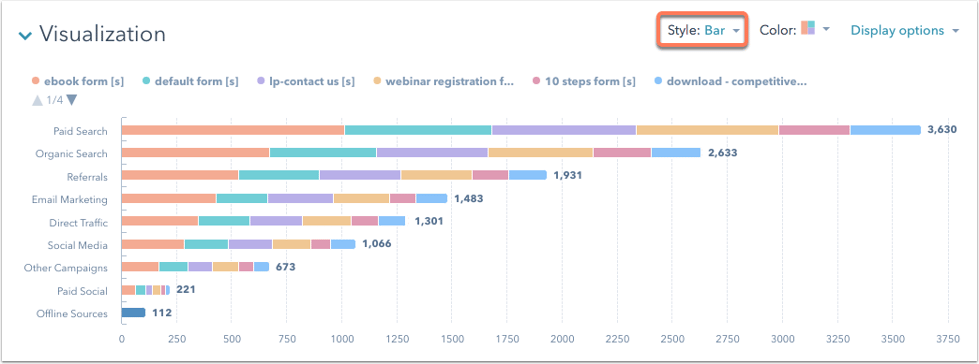
Fig. 7: Diagrams in the Custom Report Builder (source: HubSpot)
Tables and diagrams. This makes it easier for you to compare your data, better understand developments and optimize activities.
Find out more: Different chart types in HubSpot reports
*Available for all Pro+ customers
SMS or WhatsApp subscription status of a contact using workflows (Set a contact's SMS or WhatsApp subscription status using workflows)
You can now set or update your contacts' SMS or WhatsApp subscription type using a contact-based workflow.
*Available for Marketing Hub and Service Hub Pro+ customers
Build lists filtered by a WhatsApp subscription status (Build lists filtered by a WhatsApp subscription status)
This update allows you to build static or dynamic lists based on WhatsApp subscription status (subscribed, unsubscribed, unsubscribed). Email list segmentation is similar, so you should be familiar with it.
*Available for Marketing Hub and Service Hub Pro+ customers
Commerce Hub
Updated Checkout Page for Apple Pay and Google Pay (Updated Checkout Page with Apple Pay and Google Pay)
The HubSpot Payments checkout page has been updated to include a revised layout for credit card payments and a more secure ACH flow that instantly verifies bank accounts. As a Native Payments merchant, you also have the option to offer Apple Pay and Google Pay payments to your shoppers.
Providing secure and efficient payment methods at checkout is critical to increasing conversions and sales. Integrating Apple Pay and Google Pay is another way to achieve these goals and provide your shoppers with a seamless, faster payment experience.
*Available for all users with Starter+ plans
**HubSpot Payments is available to US-based customers using a Starter, Professional or Enterprise edition of any Hub.
More flexible checkout (More Flexible Checkout Embed)
The new "Order Summary" in HubSpot allows merchants to fully utilize features such as discount codes. Shoppers can also add optional products and enter quantities and amounts.
*Available for all users with Starter+ plans
**HubSpot Payments is available for US-based customers using a Starter, Professional or Enterprise edition of any Hub.
Automatically generate invoices for subscription payments
For HubSpot Payments customers billing via recurring subscriptions, an invoice is now automatically generated to facilitate revenue tracking.
*Available for all users with Starter+ plans
**HubSpot Payments is available for US-based customers using a Starter, Professional or Enterprise edition of any Hub.
Company properties on Payment Links (Company properties on Payment Links)
Company properties can now be added to payment links. This allows you to collect contact and company information where the customer pays.
*Available for all users with Starter+ plans
**HubSpot Payments is available for US-based customers using a Starter, Professional or Enterprise edition of any Hub.
CRM Platform
Custom Object Descriptions
Now administrators can add a short description for Custom Objects to provide more clarity to everyone who interacts with them. This description for custom objects will be visible in various places, e.g. in the settings, in the data model overview and during import.
Note: In this version, you can also select an existing property and set it as a secondary display property during editing.
*Available for all customers with at least one Enterprise Hub
More Precise Large Exports (A More Precise Large Export)
The large export alert has been updated to give Superadmins more control over how they are notified of large exports from their portal. Now they can choose to be notified each time an export exceeds a certain number of records that they specify. Previously, they only received this notification when more than 50% of the records in their portal were exported.
*Available for all Hubs and Tiers
Commenting in Lists
You can now comment on individual lists in HubSpot.
*Available for Pro+ customers
Correct invalid values in dropdown selection options (Remap incorrect values on dropdown select properties)
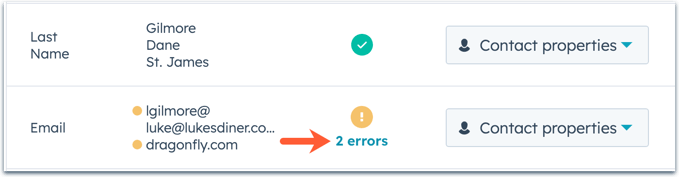
Fig. 8: Quick troubleshooting (Source: HubSpot)
And you now also have the option of converting an incorrect selection in a dropdown list into a correct option without interrupting the import process.
More on the topic: Checking and fixing import errors
*Available for all hubs and tiers
Property source information now available in property history exports (Property Source Information now available in property history exports)
Previously, the export of a property's history showed the various values and change dates in the CRM for that property. Now more details have been added to the export so you can also find out which user and tool caused a change to that property in the CRM.
*Available for all Hubs and Tiers
CRM editor for data pages (CRM Record Page Editor)
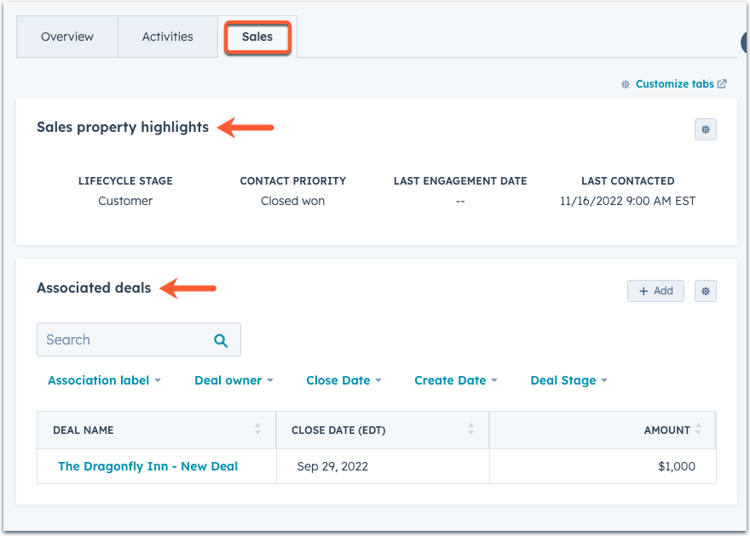
Fig. 9: Customize middle data column (Source: HubSpot)
Are you an admin? With the brand new CRM record page editor, you can easily customize the middle column of a record to suit your company's requirements. For example, you can add new cards and tabs to the data page so that your teams can access the right information at the right time.
This is how it works: Customize the middle data column
*Available for all hubs and tiers
"Freezing" the First Column on Index Pages
With the new "Freeze Column" setting, you can quickly and easily freeze the first column in a view. This allows you to keep an overview of your table data while you are working on a specific data record.
*Available for all hubs and tiers
Unique IDs for import contacts (Custom Unique IDs for Contacts in Import)
HubSpot now allows you to use unique custom IDs for contacts in import. You can now upload and map your data for contacts, companies, deals, tickets, and custom objects by using a unique identifier of your choice.
*Available for all Hubs and Tiers
Conditional Property Logic
The Conditional Property Logic feature allows administrators to display and query the appropriate information throughout CRM at the right time. On theCustomize Record Creationpage, admins can now set conditional logic for properties added to the Create Record form, as well as one for enumeration properties - regardless of whether they are already assigned to the Create Record form. The logic is activated when employees make changes to properties in CRM.
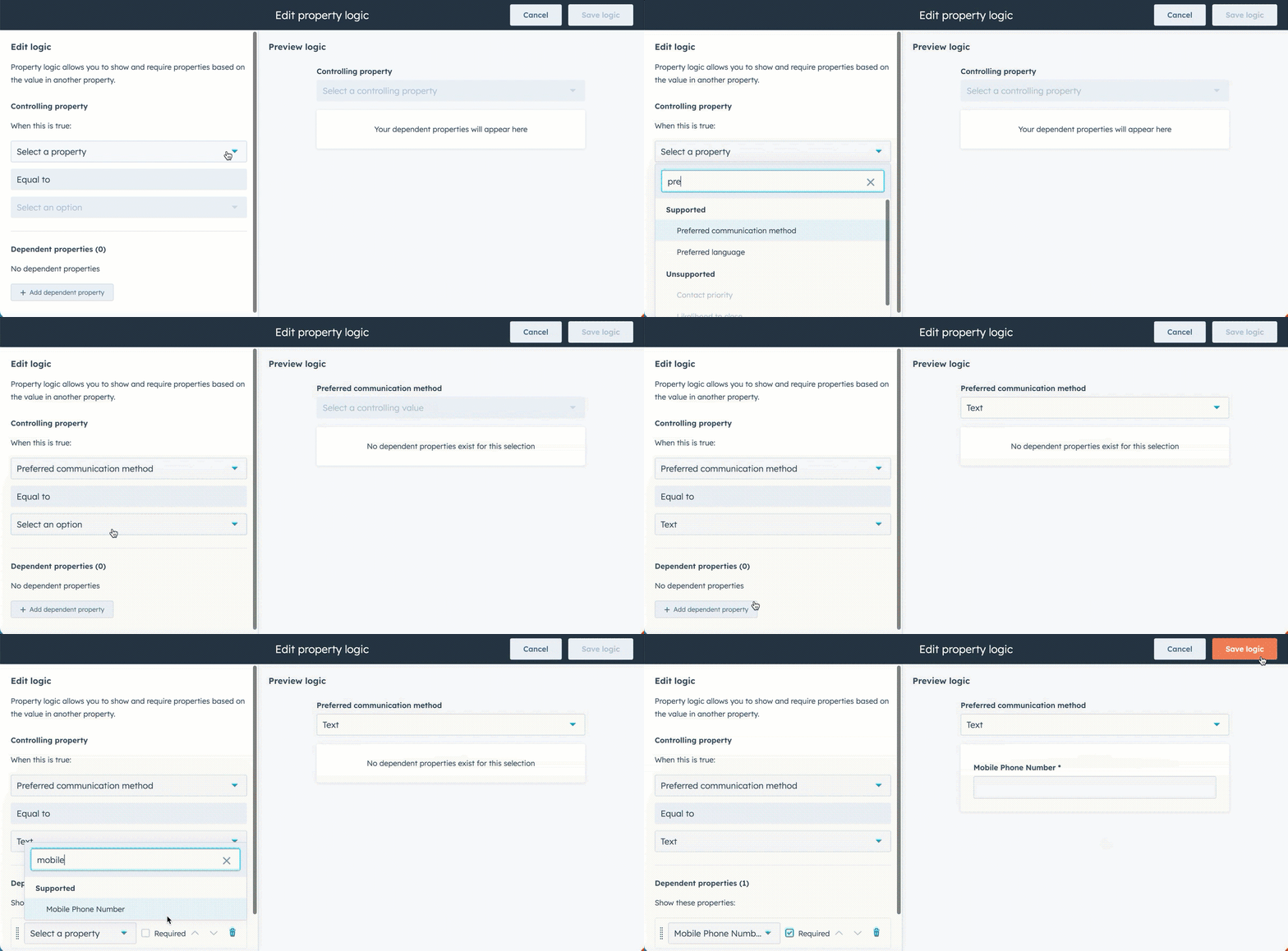
Fig. 10: Sounds logical: setting conditional properties (source: HubSpot)
You can find out more about this topic here: Set conditional logic for enumeration properties
*Available for all Pro+ customers
Auto-complete in the Advanced Formula Editor (Auto-complete for the Advanced Formula Editor)
Auto-complete is designed to make writing formulas more efficient and accurate. It offers intelligent suggestions and real-time guidance when improving formulas.
Previously, however, customers had to enter the complete name of a property or function manually or choose from an extensive list of options. Fortunately, this is now a thing of the past: with the new "autocomplete" function, options for properties or functions can be automatically predicted and suggested as soon as they are entered. The big advantage of auto-complete: It simplifies your work, reduces errors and improves your efficiency.
*Available for all Pro+ customers
App Marketplace & Integrations
App Marketplace: New and improved apps! (New and Improved Apps in the App Marketplace)
The HubSpot App Market place makes it easy to integrate existing tools or discover new apps to help your business grow - for example, the newly certified Webflow app: It simplifies the world of marketers who want to connect their Webflow creations directly to HubSpot and configure business-critical automations.
Whether Slack or Salesforce: Since July 2023, HubSpot has added more than 71 new apps to the App Marketplace and over 17 apps have been equipped with new features.
More apps in the App Marketplace
*Available for all hubs and tiers
New Webflow app for HubSpot (New Webflow App for HubSpot)
The newly certified and updated Webflow app makes it easier for you to connect your Webflow website with HubSpot and optimizes the performance of both platforms. Now you can:
- Embed and design HubSpot forms in the Webflow designer
- Link and synchronize Webflow forms with HubSpot forms in the Webflow Designer
- Add HubSpot assets to your Webflow site
- Integrate HubSpot chatbots into your website
- Easily add the HubSpot tracking code to your website
*Available for all hubs and tiers
Embed HubSpot in Salesforce (Enroll in a HubSpot Sequence from Salesforce)
You now have the option of enrolling your contacts in a sequence directly from Salesforce to automate your outreach.
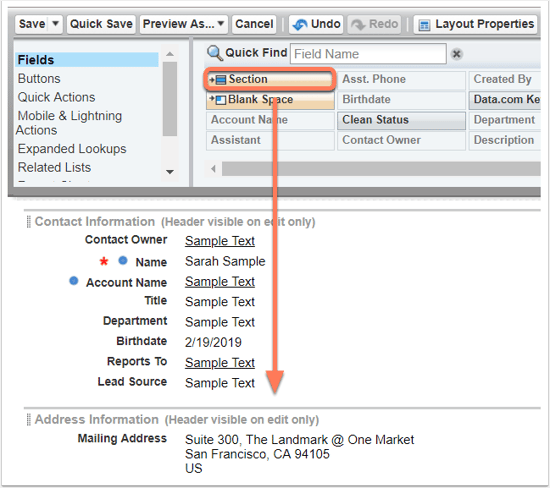
Fig. 11: HubSpot in Salesforce (Source: HubSpot)
*Available for all Pro+ customers
Book HubSpot Meetings from Salesforce (Book HubSpot Meetings from Salesforce)
Very handy: If you are a Salesforce and HubSpot customer, you can now schedule a HubSpot meeting directly from a contact or record without leaving Salesforce.
*Available for all Pro+ customers
New permission requirements for installing public apps from third-party websites
Previously, the "App Marketplace Access" permission was required to install apps from the HubSpot App Marketplace. In future, this authorization will be required to implement all integrations, including applications from third-party websites.
The App Marketplace Access permission is now required in addition to any other required permissions requested by the app for access.
*Available for all Hubs and Tiers
Integrations Sync Card for Data Sync: Zoho CRM, Pipedrive, Copper, Odoo & Shopify (Integrations Sync Card for Data Sync: Zoho CRM, Pipedrive, Copper, Odoo & Shopify)
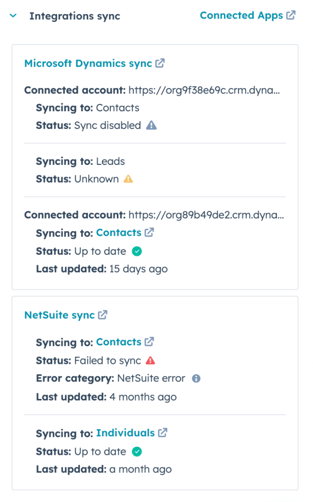
Learn more: Synchronization map for integrations
*Available for all hubs and tiers
Fig. 12: Synchronize the easy way (Source: HubSpot)
Mobile
Calls, notes, logged activities: Automatically Associated with Correct Records on your Mobile (Calls, Notes & Logged Activities Now Associated with the Correct Records on Mobile)
The logic described in the Knowledge Base article"Associating activities with records" is now integrated into the app. This means that when you log an activity with a contact, for example, your main company and recent open deals will automatically appear as "pre-selected" associations. You can then add or remove more shortcuts as you wish.
*Available for all Hubs and Tiers
Edit your marketing emails on mobile now (Edit Your Marketing Emails on mobile)
Did you already know? Marketing emails are one of the most popular solutions in HubSpot. Many marketers use this great tool on a daily basis and integrate it seamlessly into their inbound marketing strategies. With the activation of marketing emails in the app, we now offer them a seamless experience across different platforms, helping them to better control and manage their communications.
Following the first release, new features will soon be introduced specifically for marketers on the go. In this second version, you as a marketer can go one step further - and process, schedule and send your regular, automated, blog, RSS, follow-up and time zone marketing emails with maximum efficiency
*Available for Marketing Hub Starter+ customers
Better Facebook posts on mobile (Publish richer Facebook posts on mobile)
Another great news for marketers: You can now add 20 images to your Facebook posts on mobile. By removing the old limit of four images, marketers can create richer content on the social network and share more engaging stories.
*Available for Marketing Hub Starter+ customers
Create better LinkedIn posts, with videos and more images from mobile
With this latest mobile social update, you can publish videos to your personal LinkedIn accounts and create posts with more than 4 images.
Get help here: Create, publish & review social posts in the HubSpot mobile app
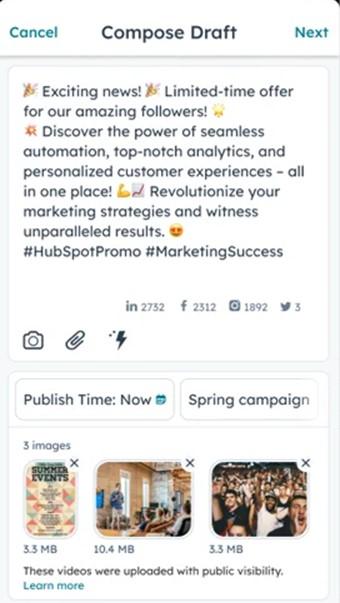
Fig. 13: Creating great LinkedIn posts (Source: HubSpot)
*Available for Marketing Hub Pro+ customers
Access and Manage Your Files on Mobile (Access and Manage Your Files on Mobile)
In this first version, you can upload, preview, save, download, share and move your files to the trash.
On the one hand, you can access all your files via the main navigation of HubSpot Mobile under the menu item Files. There you can search and sort your files and navigate through your folders. Once you have found the file you are looking for, you can either move it to the trash, download it, save it to your smartphone or share it natively.
On the other hand, you can also upload your content to files!
*Available for CMS Free+ customers
Multi-Hub Updates
Cancellations of membership emails (Membership Email Cancellations)
From now on, membership registration emails will be automatically canceled in case of insufficient performance. On top of that, HubSpot has updated the visibility of cancelations in the private content and message settings in the HubSpot app - so you will be notified directly when registration emails are canceled.
*Available for Service Hub Pro+ and CMS Hub Enterprise customers
Global Toolbar Above HubSpot Nav, with a more discoverable Search
A new toolbar above the current navigation bar will give you easier access to useful functions such as calls and help. The global search field is now also much more visible.
*Available for all Hubs and Tiers
Automatic follow-ups for registrations (Automated Registration Email Follow-Up for Private Content)
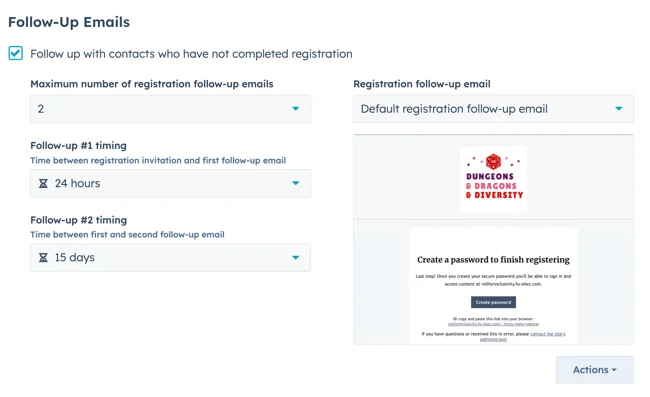
Fig. 14: Email messages for registrations (Source: HubSpot)
You can now set up automatic email messages for registrations in the private content settings. This function automatically sends emails to contacts who have not completed their account registration - an important aspect, as contacts can only access private content once their registration is complete.
Here's how it works: Set up automatic follow-up registration emails for private content
*Available for Service Hub Pro+ and CMS Hub Enterprise customers
New data privacy dashboard (New Data Privacy Dashboard)
HubSpot has introduced a new data privacy dashboard that provides you with six reports on your contacts' interest and behavior, their region, the legal basis for processing contact data, and more. With this data, you can better track and manage your contacts and address privacy risks.
*Available for all Hubs and Tiers
More details and labels on each Global Search result
Global Search now shows additional details on contacts, companies, deals, tickets or tasks. Each detail in the result is now labeled to make it easier to understand what is meant. This allows you to quickly identify the result you are looking for even if it has similar names or properties.
*Available for all Hubs and Tiers
Simplified Apex Redirect Setup (Simplified Apex Redirect Setup)
When connecting a custom domain, both the versions with and without "www" will be redirected by default. You can activate or deactivate these automatic redirects as you wish.
*Available for all hubs and tiers
Multi-language subtitles for HubSpot videos (Multi-Language Subtitles for HubSpot Video)
Whether French or Spanish: You can now select and upload multiple subtitle files in different languages. Simply select the subtitle option in the player - and bang - a list of available subtitle languages appears immediately.
*Available for Marketing, CMS and Service Hub Pro+ customers.
Bundling of comment notifications (Comment Notification Bundling)
Comments that are left in quick succession on the same topic are now bundled together. Great for you as a user: you receive fewer messages - and if you do, then only helpful ones for your work.
*Available for all Pro+ customers
Customizable options for session timeout due to user inactivity (Customizable options for session timeout due to user inactivity)
If a user is inactive for a certain amount of time, the HubSpot session timeout will now force them to log back into HubSpot. The default value for the inactivity timeout is 24 hours. New for admins: You can now set the time after which users are automatically logged out if they are inactive.
*Available for all hubs and tiers
Improvements for unread comments (Unread comment improvements)
There are a number of updates to the collaboration sidebar to make it easier for you to find new and unread comments. Here are the updates:
⦁ Display of a counter for unread comments
⦁ Preview of unread comments
⦁ Direct link to new comments in e-mail messages
*Available for all Pro+ customers
Overview of users and new user properties on user record
Great news for admins: you can now view detailed information on portal usage (for company levels only), connected accounts, security and mapping data at user level on the new Overview tab on the user record.
*Available for all hubs and tiers
Timezone Switcher for Date and DateTime Properties
This update gives you more information about the timezone in which a date or datetime property is evaluated. The backend system that supports lists stores date and datetime properties in different timezone formats. By default, date and datetime properties are stored and evaluated based on the following time zones:
- Dates: UTC
- Date time: Portal time zone
This means that depending on where you are in the world compared to the time zone of your portal, unexpected records may be qualified for lists if these date or datetime properties are used in the filters. For example: If your main office is in Boston and you are located in Dublin.
*Available for all hubs and tiers
Improved user table with more information and filtering options (Updated User Table with Additional Data and Filtering)
Hooray, there's a new user table - with additional details about the users of a particular portal. You can now easily scroll through the new properties to get a more comprehensive overview of a user's status, configuration and recent activities.
The properties displayed will vary depending on the subscription, but may include the following:
- Name
- Seat (Sales Seat, i.e. number of integrated employees)
- Authorization sets (Enterprise)
- Access level
- Main team (Professional+)
- Additional teams (Professional+)
- Invitation status
- Partner user
- Last active
- SCIM status (Enterprise)
- E-mail status
- Calendar status
- Calendar synchronization
- Scheduling pages
*Available for all Hubs and Tiers
Security Center: Easily move users from super admin to lower levels of permissions in Security Center
In the Security Center, it is recommended to limit the number of super admins in your accounts and remove unnecessary ones. With the new wizard, you can now easily select a permission set or permission template to quickly adjust a super admin's permissions, even for several at once.
*Available for all Hubs and Tiers

.png?width=400&name=Spotlight%20HubSpot%20(1).png)