Event Management with HubSpot
From Registration to Follow-Up, All in One System

How Konzepthaus integrates registration, QR code check-in, badge printing, and follow-up—all with custom-developed features—directly into HubSpot.
The landing page is up, the invitations have been sent out, and the first registrations are coming in. What sounds like a smooth start quickly becomes complex for many events: attendee lists are in Excel, confirmations are sent via a separate email tool, check-in takes place in yet another application, and after the event, the data has to be painstakingly consolidated.
Every single step works. But the processes aren’t connected.
This not only costs time—it also makes it difficult to maintain an overview: Who registered? Who actually attended? Which sessions were booked? What interests emerged during personal interactions? And what follow-up communication should take place after the event?
This is precisely where the potential of integrated event management based on HubSpot lies. When registration, communication, check-in, and evaluation come together in a single system environment, a series of individual tasks becomes a seamless process.
At konzepthaus, we’ve developed and continuously expanded our own technical foundation for this purpose across multiple client projects. The result isn’t a rigid, off-the-shelf product, but a field-tested framework within HubSpot that we can adapt to different event formats, processes, and requirements.
Events Are Not a Special Case Outside the CRM
Events are important touchpoints along the customer journey. Nevertheless, the data generated during these events is often managed separately from marketing, sales, and service.
Yet events provide valuable context: A registration indicates interest. Actual attendance demonstrates engagement. Booked sessions, meetings, and contact requests offer insights into specific topics and needs.
When this information is directly linked to existing contact and company data in HubSpot, a more complete picture emerges. Marketing can tailor its communications more effectively, Sales gains relevant follow-up opportunities, and event teams gain transparency into capacity, attendance, and feedback.
Therefore, it’s not just about digitizing individual event tasks—it’s crucial to integrate them with existing data and processes.
Developed by konzepthaus and refined through real-world experience
Our solution wasn’t conceived on the drawing board. It was developed in collaboration with clients for real-world events and refined with every new requirement.
An early starting point was event management for a major mid-sized client. For a two-day forum with more than 800 participants and 90 presentations, we mapped out the event process in HubSpot—from registration to ticket issuance to check-in. Custom requirements such as promo codes, automated validations, different attendee types, and real-time dashboards were directly integrated into the process logic.
Subsequent projects introduced new requirements: multiple registrations, QR code generation, self-check-in, badge printing, breakout sessions, digital lead capture, and more sophisticated reporting. Step by step, these individual solutions evolved into a stable, reusable architecture.
Today, when we take on a new project, we don’t have to start from scratch. The technological foundation is in place, core processes have been thoroughly tested, and our team understands the critical interfaces between CRM, content, automation, and custom development. Building on this foundation, we configure and expand the solution to fit each company’s specific needs and event concept.
As a HubSpot Elite Solutions Partner, we combine the perspectives of developers, consultants, and strategists to achieve this. The result is not just a technically functional application, but an event process that aligns with the existing HubSpot architecture, internal workflows, and ongoing customer communication.
Which Event Processes Can Be Mapped with HubSpot
Depending on the event format and requirements, a HubSpot-based solution can support the entire process:
- Landing pages and multi-step forms for registration
- Registration of multiple people in a single booking process
- Automated confirmations, reminders, and organizational information
- Custom QR codes as digital tickets
- Manual check-in or self-check-in on-site
- Automated printing of personalized name tags
- Booking and management of breakout sessions
- Digital collection of interests and contact requests
- Dashboards and reports on registration, attendance, and capacity utilization
- Feedback and follow-up communication after the event
Which features are actually useful depends on the specific format. A customer event with 100 attendees has different requirements than a trade show with multiple exhibitors and more than 1,000 guests. The technical foundation should therefore be standardizable without losing the necessary flexibility.
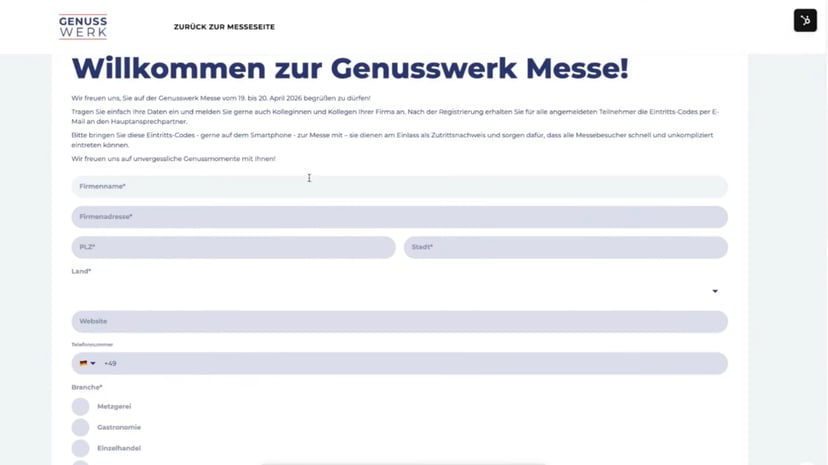
From the registration form to the follow-up: a seamless process
1. Registration without manual attendee lists
Registration begins on a landing page with a form tailored specifically to the event. In addition to standard individual registrations, multiple people can also be registered in a single process.
The information is stored in a structured format in HubSpot and linked to existing contact and company data. This eliminates the need to manually transfer form responses into separate lists. At the same time, an up-to-date database is available from the start for capacity planning, communication, and reporting.
2. Automated Pre-Event Communication
Once registration is complete, the appropriate communications are triggered automatically. Participants receive a confirmation and—depending on the setup—their personal QR code. Reminders, organizational notes, or last-minute changes can be sent specifically based on registration status.
This ensures that each person receives the information relevant to them, while the event team has to coordinate significantly fewer manual emails.
3. Fast check-in and personalized name tags
On the day of the event, the QR code serves as a digital ticket. It can be scanned by the team at the reception desk or used for self-check-in. The participant’s status is updated immediately and can trigger the printing of a personalized name badge.
Especially at larger events, this process ensures shorter wait times and provides a reliable overview of who is actually on-site.
4. Digitally Capture Contacts and Interests
At trade shows, the flow of relevant data doesn’t end at the entrance. Interactions between exhibitors and guests can also be supported digitally.
For example, a QR code on the name badge can open a pre-filled form. There, attendees can add their interests, meeting notes, or contact requests. The information is then made available in a structured format for further processing—without handwritten notes or having to type it up later.
5. Analysis and Follow-Up
After the event, registration and attendance data aren’t isolated in a separate application but can be analyzed in HubSpot and used for downstream processes.
Among other things, this enables:
- comparing registrations with actual attendance
- analyses by company, target group, or event format
- analyzing booked sessions and topics of interest
- personalized follow-up workflows
- the targeted transfer of relevant contacts to sales or service
- Feedback surveys to optimize future events
This approach treats the event not as a one-time, standalone occasion, but as part of an ongoing customer relationship.
Case Study: GENUSSWERK—Efficiently Registering and Checking In 1,500 Guests
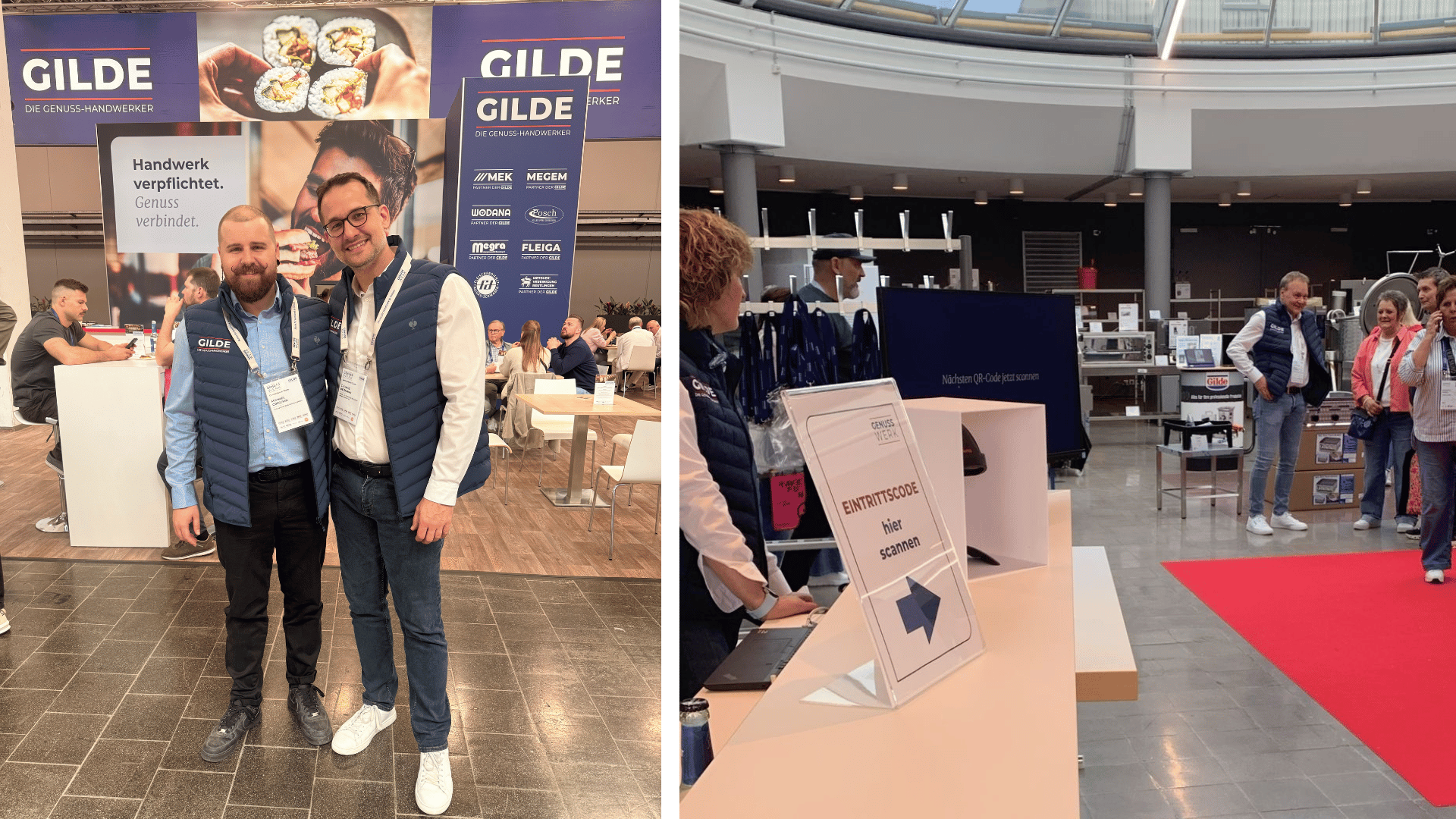
Our implementation for GENUSSWERK in Ulm—a trade show format organized by GILDE – Ihr Partner für das Lebensmittelhandwerk e.G. and its partners, the leading food wholesalers and industry initiatives in Southern Germany, Vorarlberg, and Switzerland— demonstrates how such a process can work in practice. Around 1,500 trade visitors met with more than 160 exhibitors there.
Registration took place via a compact one-page landing page with a multi-step form. Through this, participants could register not only themselves but also other people. Confirmations and personalized QR codes were then sent out automatically.
On-site, guests scanned their QR code at check-in. A personalized name tag was then issued immediately. An additional QR code on the badge facilitated digital contact tracking between exhibitors and visitors: After scanning it, a pre-filled form opened where interests and contact requests could be recorded.
This created a seamless process—from initial registration through admission to the structured follow-up of contacts.
A proven foundation—tailored to each company
A single event can be set up relatively quickly using forms, properties, and workflows. However, as soon as different formats, recurring events, or more complex registration processes are added, the underlying structure becomes crucial.
In our HubSpot-based solution, events are structured using custom objects. This allows event data, attendees, status information, and other relevant objects to be neatly linked together. New events and new client projects can build on a proven architecture rather than having to be designed from scratch each time.
This makes a significant difference: While setup initially took several days, a new event can now be set up within a few hours using a standardized setup. At the same time, there is still ample flexibility for individual requirements—such as forms, check-in processes, session bookings, or reporting.
The basic framework provides stability and saves development time. However, we determine which components to use and how the individual processes are designed on a case-by-case basis for each company. A smaller client event may require only registration, communication, and check-in. At a trade show, additional features such as multiple registrations, badge printing, exhibitor processes, and lead capture may be relevant. For paid events, payment and invoicing processes are added to the mix.
Standardization and customization are therefore not mutually exclusive. A good architecture combines both—and can continue to grow along with your requirements.
Why map as much as possible directly to HubSpot?
Of course, existing event platforms can also be integrated with HubSpot. The HubSpot Marketplace offers various apps that, for example, synchronize registration and attendance data with the CRM.
Our approach takes a different path: We map as many event processes as possible directly within the existing HubSpot environment. This eliminates the need to first transfer data between multiple systems and reconcile different data models. Contacts, companies, registrations, communications, and follow-ups all draw from a common foundation.
This is a decisive advantage, especially for custom workflows. Instead of adapting your own processes to the limitations of a standard tool, we develop the necessary logic tailored to your company—based on an architecture that has already proven itself in multiple projects.
Case Study: VME—Event Management as Part of a Central Service Platform
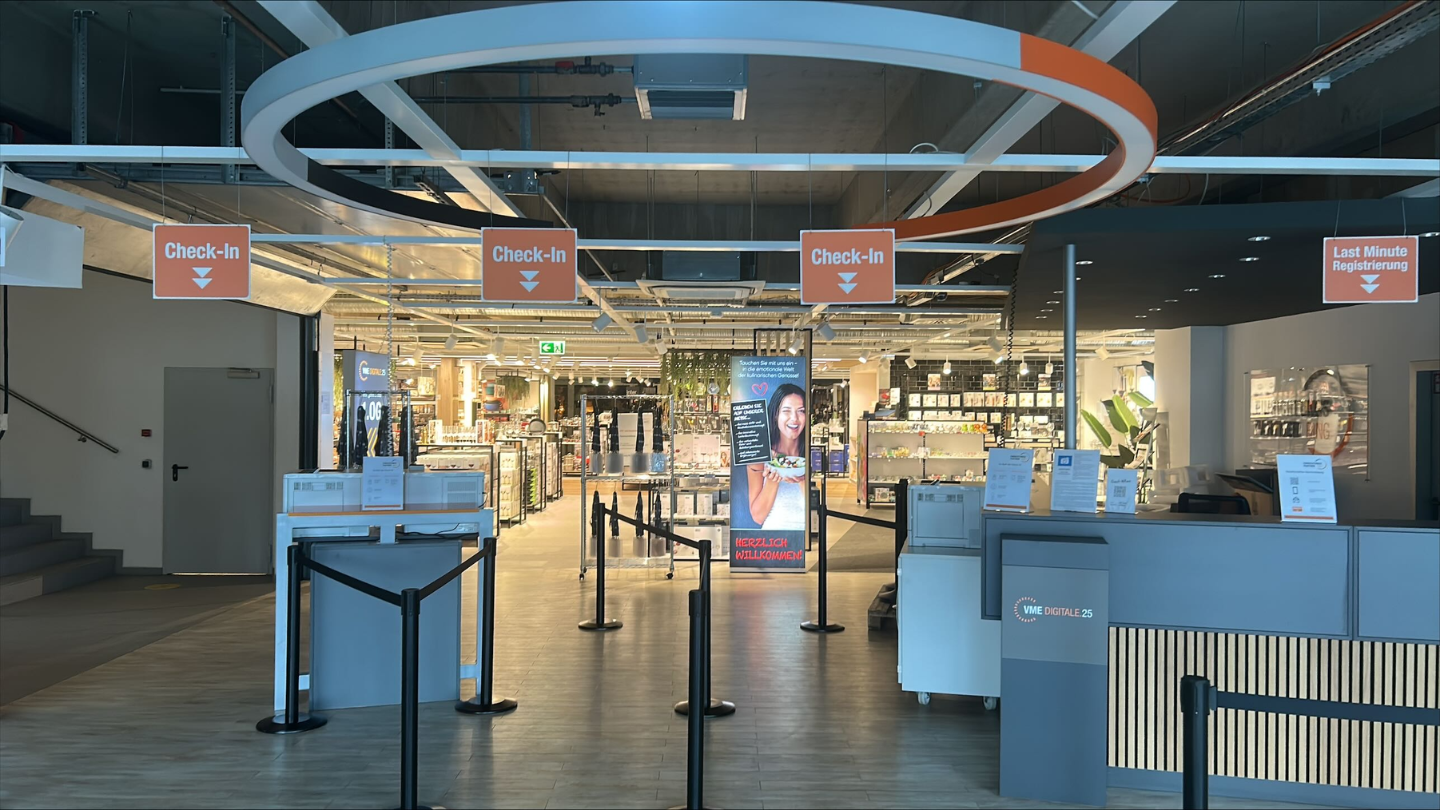
Our independent project with VME Einrichtungspartnerring demonstrates how integrated event management functions within a broader platform strategy. There, HubSpot was established as the central platform for member, service, and company data. Event processes are also organized within this system landscape: from registration through automated communication channels to evaluation and follow-up.
The key advantage lies in the integration. Event data isn’t isolated from the rest of the member and service data but complements the existing view of companies and contacts. This reduces manual effort, increases transparency, and creates a scalable foundation for further digital processes.
Learn more about the project in the case study on VME Einrichtungspartnerring
What future enhancements are possible
Once the technical foundation is in place, the event process can be further developed step by step. Possible examples include dynamic agendas, automated event dashboards, integrated feedback processes, or the management of paid events.
Not every feature needs to be implemented from the start. It makes more sense to have an architecture that can grow with the requirements. For example, a project might begin with registration and email communication and later be expanded to include check-in, badge printing, session planning, or payment processes.
Conclusion: Successful event management starts with interconnected processes
A good event experience doesn’t just happen on the event floor. It starts with a simple registration, continues with relevant communication and a smooth check-in, and ends with appropriate follow-up.
When these steps are consolidated in HubSpot, it’s not just the attendees who benefit. Event teams save on manual work, marketing and sales teams receive better data, and companies gain a solid foundation for planning future events.
The greatest value, therefore, doesn’t come from a single feature, but from integrating events, CRM, and communication into a unified system.
This is exactly why we at konzepthaus have laid the technical and conceptual groundwork in our past projects. We bring the proven framework, practical event experience, and development expertise—and use them to create a solution tailored to each company’s individual needs.
Want to integrate your event processes with HubSpot?
Whether it’s a customer event, conference, or trade show: Together, we’ll review your requirements and your existing HubSpot environment. Based on our field-tested event architecture, we’ll show you how registration, communication, check-in, and evaluation can be implemented in a customized and scalable way.
Schedule a free consultation now

FAQ Frequently asked questions about bespoke event management in HubSpot
Is event management included as standard in HubSpot?
No. Whilst HubSpot does provide basic features such as landing pages, forms, CRM data, emails and workflows, a complete event management process – including multiple registrations, personalised QR codes, check-in, badge printing and session management – is not included as standard. At konzepthaus, we have developed these features individually, drawing on our expertise in HubSpot and software development.
Is this a separate event management programme?
No. We have not developed a standalone events programme that runs independently of HubSpot. The events features we have developed are integrated directly into the existing HubSpot system landscape. This ensures that contacts, companies, events, registrations and attendance data remain linked.
What event features has konzepthaus developed for HubSpot?
Our technical infrastructure can support, amongst other things, multiple registrations, personalised QR codes, check-in and self-check-in, automated badge printing, breakout sessions, digital lead capture and event reporting. These features are not part of HubSpot’s standard functionality; rather, we developed them for real-world client projects and subsequently expanded them into a reusable architecture.
How is the event solution technically implemented in HubSpot?
We combine existing HubSpot features with bespoke logic. Depending on the project, this may include, for example, forms, workflows, CRM properties, custom objects, bespoke programming and relevant interfaces. The result is an event solution that operates within the existing HubSpot architecture and can be tailored to the relevant processes.
Why are the event processes implemented directly in HubSpot?
Thanks to direct integration with HubSpot, there is no need to transfer relevant data between an external event tool and the CRM. Companies that already use HubSpot also do not need an additional event management tool, which would incur further licence costs. The bespoke event functions are integrated directly into the existing HubSpot system landscape. Registrations, attendance status, interests and contact requests are therefore available in the same system as existing contact and company data. This creates a shared database for the events team, marketing, sales and customer service.
Welche Eventprozesse können individuell entwickelt werden?
Depending on the event concept, we can implement a range of features in HubSpot, including registration, multiple registrations, automated communications, QR code generation, check-in, name badge printing, session bookings, lead capture, reporting and follow-up. We assess which features are actually required for each company.
Can HubSpot be used for event check-in without custom development?
A complete check-in process featuring personalised QR codes, real-time updates to attendance status and automated badge printing is not available as a ready-made standard feature in HubSpot. Such workflows require a suitable technical architecture and bespoke development. This is precisely why we combine our HubSpot expertise with practical development know-how.
What sets this solution apart from traditional event software?
Traditional event management systems are often used as add-ons and then integrated with the CRM. Our approach integrates the bespoke event functions directly into the HubSpot ecosystem. This allows event data to be fed directly into existing marketing, sales and service processes without the need for separate data sets.
Does the event solution have to be developed from scratch for every company?
Not entirely. We have already developed a tried-and-tested technical foundation on which new projects can be built. The basic framework is then adapted to the event format, the existing HubSpot architecture and the company’s specific requirements, and expanded as necessary.
For which businesses is a bespoke event solution in HubSpot suitable?
This approach is particularly suitable for companies that already use HubSpot as their central CRM platform and wish to integrate their event processes closely with marketing, sales or customer service. It is also worth considering if standard event tools do not adequately support their own workflows or if they would result in too many separate systems.